Android how-to
How to Sign a PDF on Android Without Printing or Scanning
Sign a PDF on your Android phone without printing: draw your signature, fill in form fields, scan paper pages and share the signed file from your phone.
Oct 14, 2026


Android tool · PDF
Draw your signature once, place it on any PDF, fill in form fields and scan paper pages with your camera – right on your phone, fully offline.
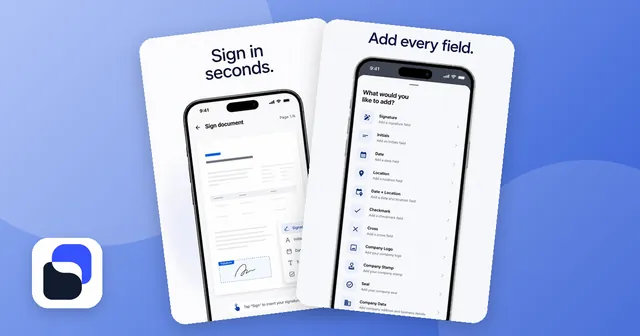
Draw your signature with a finger or stylus, save it with your initials and place signature, initials, date, name or free text anywhere on the page – also on multi-page contracts.
Open a form, tap a field and type. Zoom in for exact placement. What you see in the editor is what the finished PDF looks like.
Scan paper with your camera. Edges are detected automatically, crooked pages are straightened without changing the content, and several pages go into one PDF.
Combine PDFs without a watermark, pull out single pages, and shrink files for email and upload limits at the compression level you choose.
Turn JPG or PNG photos into a PDF with margins in millimetres, export PDF pages as images, and lock a PDF with a password and permissions.
Mark the signature fields, hand over your phone, and the app guides the other person field by field – no email or link needed.
A contract, a rental agreement or a school form arrives as a PDF, and you have no printer at hand. With Sign PDF you open the file on your Android phone, tap where the signature goes and place it. Your signature and initials are saved once, so the next document takes seconds. Date, name, place, checkmarks and free text go anywhere on the page, and a multi-page contract can be signed page by page or only on the last page.
For business use there are fields for a company logo, a stamp and a seal, and you can store your address details for forms you fill in often.
Forms work the same way: tap a field, type, zoom in for small boxes. The editor shows exactly what the exported PDF will look like, so there are no surprises after saving.
If a document only exists on paper, scan it with the camera. The app finds the page edges, straightens crooked pages and puts several pages into one PDF. Then you can sign it like any other file.
Most signing services want you to register and upload your documents. This app keeps your files on your phone:
There are no ads in the app. Only anonymous usage statistics are collected – never the content of your documents.
Freelancers and small businesses signing quotes and contracts, landlords with rental agreements, tradespeople signing off jobs on site, clubs and schools collecting consent forms – and anyone who needs to sign a PDF on the go. New to this? Our guide How to sign a PDF on Android without printing walks through every step.
Yes, the app is free to download from Google Play and shows no ads. Some extras are offered as in-app purchases.
No. Signing, filling and the PDF tools work offline on your phone, also in airplane mode. Documents are kept in the app's private storage. Only anonymous usage statistics are collected, never document content.
No. The app needs no account, no email address and no registration.
A drawn signature is a simple electronic signature. It is often fine for everyday documents, but it is not a qualified electronic signature. If a contract needs a handwritten signature on paper or a qualified signature, use that form. Read more in How to sign a PDF on Android.
English, German, Spanish, French, Portuguese, Russian, Turkish, Arabic, Hindi, Chinese and Japanese – switchable inside the app.
Android how-to
Sign a PDF on your Android phone without printing: draw your signature, fill in form fields, scan paper pages and share the signed file from your phone.
Oct 14, 2026

Photo and video gallery with albums, a PIN vault, editor and storage overview.

Decibel meter with live gauge, min/max/average, calibration, history and PDF reports.

Swipe down to delete, up to keep – sort a full camera roll with a trash you can restore from.

Tap neon snakes off the board – a calm logic puzzle with 10,000 levels in fun shapes.