Android how-to
How to Hide Photos on Android: Vault Apps and Built-In Options Explained
How to hide photos on Android: Google Photos Locked Folder, Samsung Secure Folder, the .nomedia trick and gallery apps with a PIN vault compared.
Oct 14, 2026


Android tool · Photos
A gallery app for the photos and videos on your Android phone: albums your way, a PIN vault for private pictures, an editor, collages, GIFs – and a clear view of what takes up your storage.
Switch between All, Photos, Videos and Albums in a grid or mosaic view, mark favorites and find pictures with search.
Create your own albums and pick a cover picture for each one.
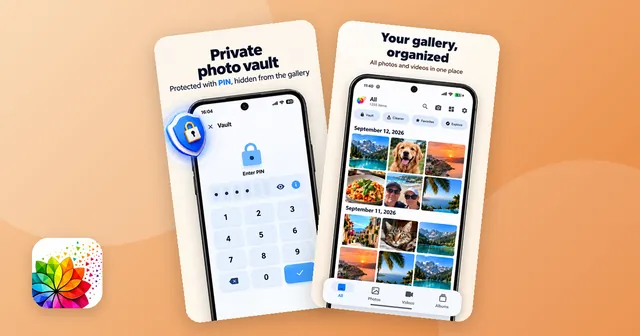
Hide photos and videos behind a PIN. They disappear from the normal gallery and return to their original folder and date when you move them back.
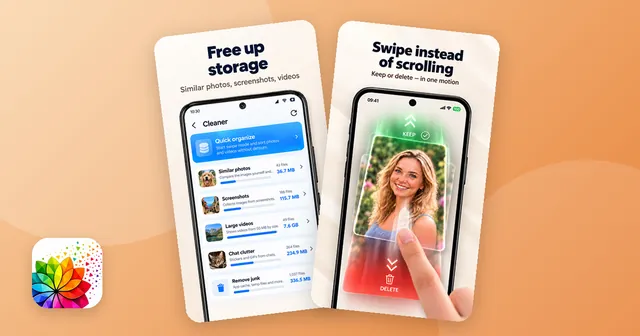
See how much space screenshots, videos of 50 MB or more, similar photos and chat stickers take up – group by group.
Go through photos in rounds of 20: move a photo up to keep it or down to put it in the app's trash. Undo is one tap away.
Crop, rotate, adjust light and color, add filters, frames, text or drawings, combine photos into a collage or turn a video into a GIF.
Photo Gallery shows the pictures and videos on your Android phone in one place. Switch between all items, photos only, videos only and your albums, in a grid or in a mosaic view. Create albums with a cover picture of your choice, mark favorites and find pictures with search. Videos play in the built-in player, and you can start a slideshow, share, rename or print a file, or set a picture as your wallpaper or contact photo.
If you turn on Show memories in Settings, the app also shows photos and videos from past years – for example what you captured on this day one or more years ago. Memories are made only from the photos and videos stored on your phone.
Some pictures are nobody else's business: ID documents, receipts, private moments. Move them into the vault and they no longer appear in the normal gallery. The vault opens with your PIN. When you move a file back, it returns to its original folder and date. The free version holds up to 25 files in the vault, Pro has no limit. More about the options on Android in Hide private photos on Android: vault apps explained.
When you first open the app, Your gallery at a glance shows how many screenshots, large videos and similar photos you have. The overview groups screenshots, videos of 50 MB or more, similar photos – near-identical shots and bursts, compared by image content – and stickers and GIFs from WhatsApp, and shows the size of each group. Checking similar photos one by one is free; removing them in one go is part of Pro.
With Quick organize you go through photos in rounds of 20. Move a photo up to keep it or down to put it in the app's trash, and use Undo if you change your mind. Files in the trash can be restored; if you like, the trash empties itself after 30 days. Read Free up storage on Android for a step-by-step plan.
The editor crops and rotates and adjusts brightness, contrast, saturation, warmth, highlights, shadows, sharpness, vignette and blur. Add filters, frames, drawings and text with outline, shadow or neon effect, or cut out the subject of a photo. Collages combine several photos with grids, borders and backgrounds, and a video or a few photos become a GIF with your choice of speed and size.
Choose Cream, Light, Dark or Night and an optional tile home screen. The app is available in 19 languages.
Yes. The gallery is free to use and shows ads. Pro is available as a one-time purchase or as a yearly or monthly subscription; it removes ads and adds an unlimited vault, premium designs and a few extra organizing tools.
No. The app shows the photos and videos stored on your phone and needs no account. Your pictures are not uploaded. The app uses an analytics service; details are in the privacy policy.
The free version holds up to 25 files in the vault, Pro has no limit. The PIN protects only the vault; the rest of the gallery opens as usual.
They go to the app's trash and can be restored from there. If you like, the trash empties itself after 30 days. Stickers and GIFs from chats are an exception: removed ones do not go to the trash.
Move them into the vault with a PIN. Our guide Hide private photos on Android compares the vault with the options built into Android.
Android how-to
How to hide photos on Android: Google Photos Locked Folder, Samsung Secure Folder, the .nomedia trick and gallery apps with a PIN vault compared.
Oct 14, 2026
Android how-to
Free up storage on Android step by step: clear app cache and downloads, delete duplicate photos, screenshots and big videos, and empty the trash.
Oct 14, 2026

Sign and fill PDF forms, scan paper to PDF, merge, split and compress – offline.

Decibel meter with live gauge, min/max/average, calibration, history and PDF reports.

Swipe down to delete, up to keep – sort a full camera roll with a trash you can restore from.

Tap neon snakes off the board – a calm logic puzzle with 10,000 levels in fun shapes.