Android how-to
How to Clean Up Your Photo Gallery on Android: Swipe to Sort
Clean up your photo gallery on Android step by step: remove screenshots, similar shots and big videos, then sort the rest by swiping, with a trash to undo.
Oct 14, 2026


Android tool · Photos
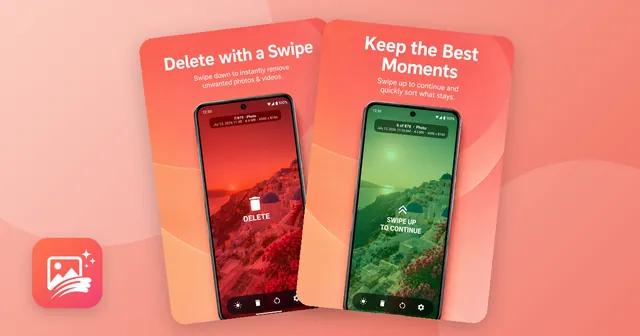
Go through your photos and videos one by one, in chronological order: swipe down to delete, swipe up to keep. A simple way to sort a full camera roll.
Photos and videos appear full screen in chronological order. Swipe down to delete, swipe up to keep and move on.
Deleted items go to a trash first. Restore single files or everything at once, or remove them for good.
The app remembers your position, so you can sort in short sessions.
At the top you see the position in your gallery, the date, the file size and the resolution of each item.
Everything happens on your phone – no cloud, no sign-up.
A camera roll with thousands of pictures is hard to clean up in a grid: everything looks small, and deciding feels like work. UpNDown shows one photo or video at a time, full screen, in chronological order. Swipe down and it goes to the trash. Swipe up and it stays, and the next one appears. That's all there is to learn.
At the top of the screen you see where you are – for example 24 of 878 – plus the date, file size and resolution. Big videos stand out quickly that way.
Deleting with a swipe is fast, so UpNDown does not delete right away. Everything you swipe down lands in the trash first. There you can look at the items again, restore single photos or all of them, or remove them permanently when you're sure.
The app also remembers your position. Sort for five minutes on the bus, close the app, and continue at the same photo later.
UpNDown works 100% locally on your phone. There is no cloud and no sign-up. The app is free and shows ads; if you prefer it without ads, a single one-time purchase removes them for good – no subscription, no recurring fees.
Want a plan for the whole cleanup? Read How to clean up your photo gallery (swipe to sort) and Free up storage on Android. If you also want albums and a private vault, have a look at Photo Gallery: Albums & Vault.
Yes. The app is free and supported by ads. You can remove the ads forever with a single one-time purchase – no subscription.
No. Swiped-away photos and videos go to the app's trash first. From there you can restore them or remove them permanently.
No. UpNDown works locally on your phone, with no cloud and no sign-up.
Yes. The app remembers where you left off, so you can sort a few minutes at a time.
Start with large videos and screenshots. Our guide How to clean up your photo gallery shows a simple order of steps.
Android how-to
Clean up your photo gallery on Android step by step: remove screenshots, similar shots and big videos, then sort the rest by swiping, with a trash to undo.
Oct 14, 2026

Sign and fill PDF forms, scan paper to PDF, merge, split and compress – offline.

Photo and video gallery with albums, a PIN vault, editor and storage overview.

Decibel meter with live gauge, min/max/average, calibration, history and PDF reports.

Tap neon snakes off the board – a calm logic puzzle with 10,000 levels in fun shapes.