Android how-to
How Loud Is Too Loud? A Plain Guide to Decibels and Phone Meters
How loud is too loud? See the NIOSH and WHO noise limits, typical decibel levels, and how to measure and calibrate a decibel meter app on Android.
Oct 14, 2026


Android tool · Noise
Turn your phone into a handy decibel meter for ambient noise, music and other sound sources – with a live gauge, a level chart, calibration and reports you can save.
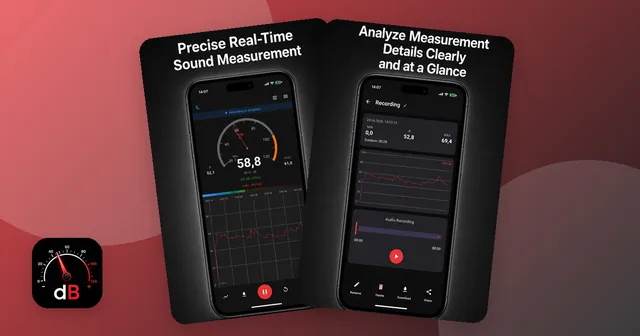
The built-in microphone measures the current sound level in decibels, shown on a gauge and as a running level chart.
Keep an eye on the lowest, highest and average reading of each measurement.
Shift the displayed value by up to 20 dB in either direction to match your phone model – against a reference meter or in a very quiet room.
Save a measurement as an audio file (M4A) and as a PDF report with chart, peak values and timestamps.
All saved measurements in one list with their values and duration – rename, share or delete them.
Keep measuring while the screen is locked, for example to check noise at night. A dark mode is easy on the eyes.
How loud is the construction site next door, the music at a party or the open-plan office? Sound Meter uses your phone's built-in microphone to measure the volume in decibels (dB) in real time. A gauge shows the current level, a chart shows how it changes, and the app keeps track of the minimum, maximum and average of each measurement.
Each measurement can be saved. In the history you see every recording with its values, duration and date, and you can rename, share or delete it. For documentation you download the measurement as an audio file and as a PDF report with a chart, the top values and timestamps – handy if you want to keep a record of recurring noise.
The app also measures in the background while your screen is locked. That is useful for noise at night, for example from traffic or a neighbor. A dark mode keeps the screen calm in the evening.
No two phone microphones are the same. The calibration dialog lets you shift the displayed value from −20 to +20 dB so it fits your device. The most reliable way is to compare with a professional sound level meter. Without one, set the reading to around 20–30 dB in a very quiet room.
Smartphone microphones are designed mainly for voice, so the values can differ from professional sound level meters – especially at very low and very high levels. Sound Meter is a practical tool to get an idea of noise levels, compare situations and keep notes. It is not a certified measuring instrument.
Want to know which levels matter? Read How loud is too loud? Measuring decibels with your phone.
Yes, it is free to download from Google Play. The app shows ads and offers in-app purchases.
Phone microphones are built for speech, so readings can differ from a professional sound level meter. Calibrate the app before first use for more reliable values on your phone. It is a handy guide, not a certified measuring device.
Open the calibration dialog and move the offset slider until the app matches a professional meter held next to your phone – or set the reading to around 20–30 dB in a very quiet room.
Yes. Start a measurement and lock your screen; the app keeps measuring in the background. Afterwards you see min, max and average and can save a PDF report.
As a rough guide, many health bodies point to 85 dB over eight hours as a limit for workplaces. Our article How loud is too loud? explains the numbers and how to measure them.
Android how-to
How loud is too loud? See the NIOSH and WHO noise limits, typical decibel levels, and how to measure and calibrate a decibel meter app on Android.
Oct 14, 2026

Sign and fill PDF forms, scan paper to PDF, merge, split and compress – offline.

Photo and video gallery with albums, a PIN vault, editor and storage overview.

Swipe down to delete, up to keep – sort a full camera roll with a trash you can restore from.

Tap neon snakes off the board – a calm logic puzzle with 10,000 levels in fun shapes.